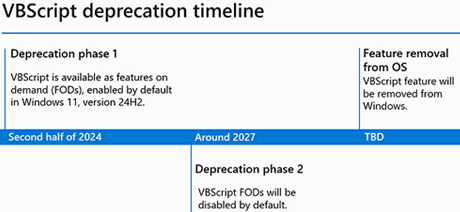
In 2024, Microsoft announced plans to phase out support for VBScript, a formerly popular Windows scripting language. VBScript scripts remain popular for automation and system management because they are simple, easy to use, and have a transparent code structure based on Visual Basic. Other advantages include the Windows Script Host’s built-in Windows runtime and interpreter, as well as access to an extensive library of ready-made scripts from Microsoft Support and third-party contributors.
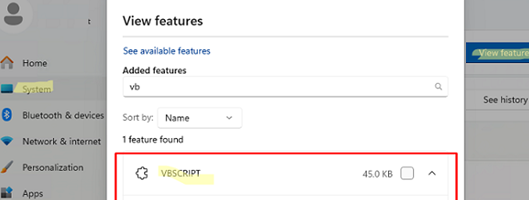
Windows users can enable or disable VBScript using the Settings app. Go to Settings -> System -> Optional features -> View optional features. The VBSCRIPT optional feature is enabled by default in Windows. If necessary, you can disable it from here.
You can also check if the VBScript scripting engine is installed on Windows using PowerShell.
Get-WindowsCapability -Online -Name vbs*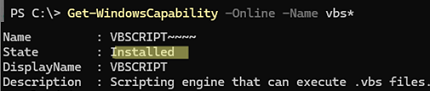
To remove the VBScript feature, run the following command:
Remove-WindowsCapability -Online -Name "VBScript~~~~0.0.1.0"Or use DISM:
DISM /Online /remove-Capability /CapabilityName:VBScriptTo install the VBscript feature, run:
DISM /Online /Add-Capability /CapabilityName:VBScriptOr:
Add-WindowsCapability -Online -Name "VBScript~~~~0.0.1.0"
If the VBScript interpreter is missing, files with the .vbs extension will lose their associated execution mappings, resulting in an error when attempting to run any VBS script from the command line.
Program 'slmgr.vbs' failed to run: No application is associated with the specified file for this operation.
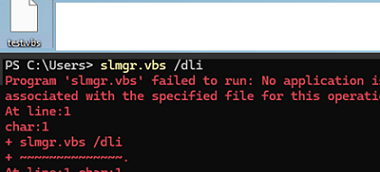
An error will appear if you try to run a VBScript via WScript.exe (graphical mode) or Cscript.exe (console mode):
wscript.exe c:\windows\system32\slmgr.vbs
Windows Script Host
There is no script engine for file extension ".vbs"
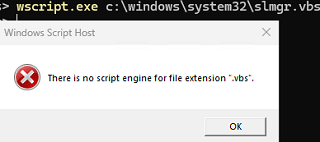
Before VBScript is globally disabled in Windows, administrators should proactively audit their environments to identify any tasks or processes that still rely on VBS scripts. Use the SYSMON tool to audit events related to the usage of VBS code on corporate computers.
Download the sysmon64.exe to a reference computer. Next, create an XML file to log the usage of the vbscript.dll library:
<Sysmon schemaversion="4.50">
<EventFiltering>
<!-- Tracking the loading of vbscript.dll -->
<ImageLoad onmatch="include">
<ImageLoaded condition="contains">vbscript.dll</ImageLoaded>
</ImageLoad>
</EventFiltering>
</Sysmon>
Save this configuration to an XML file, and then install the Sysmon service and the device driver that will monitor the VBS usage events.
Sysmon64.exe -i sysmon_settings.xml
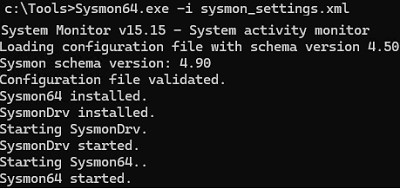
Sysmon64.exe -c sysmon_settings.xml command to update the current Sysmon configuration.From now on, an event with Event ID 7 (Image loaded: rule: ImageLoad) will be added to the Event Viewer each time the VBScript scripting engine is used. Analyzing events in the Event Viewer -> Applications and Services Logs -> Microsoft -> Windows -> Sysmon -> Operational allows you to identify VBScript usage on a computer.
Sysmon logs can be used to identify the specific VBScript files that were executed, the user who initiated them, and when they were executed.
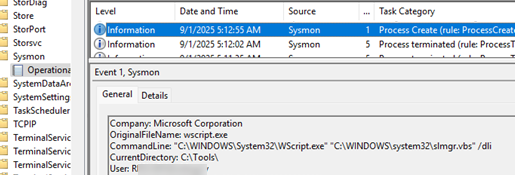
The following PowerShell script queries the Event Viewer for events that log information about files with the *.VBS extension: Event ID 1: Process Create (rule: ProcessCreate)
Get-WinEvent -FilterHashtable @{LogName='Microsoft-Windows-Sysmon/Operational'; Id=1} | ForEach-Object {
 $xml = [xml]$_.ToXml()
 $processPath = $xml.Event.EventData.Data | Where-Object {$_.Name -eq 'Image'} | Select-Object -ExpandProperty '#text'
 $commandLine = $xml.Event.EventData.Data | Where-Object {$_.Name -eq 'CommandLine'} | Select-Object -ExpandProperty '#text'
 if ($commandLine -like '*.vbs*') {
 [PSCustomObject]@{
 TimeCreated = $_.TimeCreated
 ProcessPath = $processPath
 CommandLine = $commandLine
 }
 }
 }
In my case, I found several VBScript execution events on the computer.

Thus, using Sysmon, you can audit VBScript usage events on corporate computers (it is not necessary to enable VBS auditing for all systems simultaneously. Instead, it should be limited to test groups of typical devices.). After identifying the VBS scripts in your environment, evaluate their functional relevance and assess whether their logic can be ported to PowerShell.
.vbs(VBScript).vba(Visual Basic for Application).wsf(Windows Script File).wsh(WSH settings file)
A significant number of VBScript-based scripts are still widely used across Windows environments. For example. These include the Windows activation management command (Slmgr.vbs), the Microsoft Office activation script (Ospp.vbs),the Office removal scripts (Offscrub), the system information display tool (Bginfo), etc. Since Microsoft has not provided replacements for all existing legacy tools, it is unlikely that VBScript will be completely deprecated in the near future. However, corporate administrators should start preparing for this step in advance.