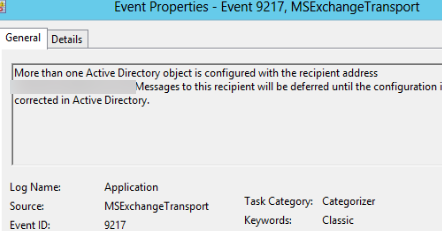
In this article, we will show you how to find duplicate SMTP addresses in your Exchange Server organization. If your organization has non-unique SMTP addresses, Exchange returns an error when sending e-mails to those addresses:
Event ID: 9217
Event Source: MSExchangeTransport
More than one Active Directory object is configured with the recipient address username@woshub.com. Messages to this recipient will be deferred until the configuration is corrected in Active Directory.
This e-mail message will not be delivered to the recipient.
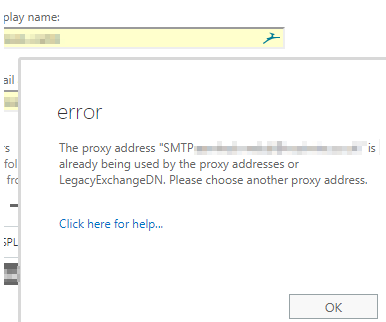
You may also face a situation when you create a new mailbox in the Exchange Server and get a message that a user with that SMTP address already exists:
The proxy address SMTP:user2@woshub.com is already being used by the proxy address or LegacyExchnageDN. Please choose another proxy address.
To resolve this error, you need to find the Active Directory objects to which the same SMTP address (alias) has been assigned.
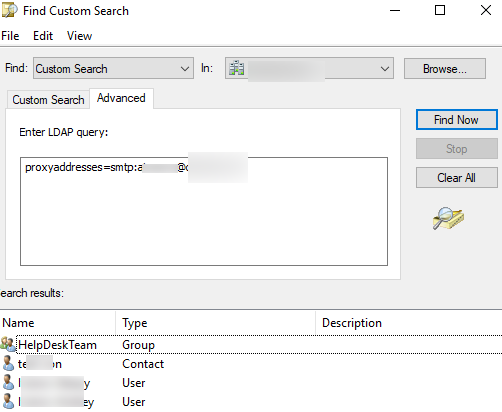
You can use the Active Directory Users and Computers console (aduc.msc) to search for AD objects with a specific SMTP address:
- Run the console, go to Find -> Custom Search -> Advanced tab;
- Enter the following LDAP query:
proxyaddresses=smtp:jsmith@woshub.com(replace the username and domain with your own); - Click Find;

- The console will display all objects that have the proxyaddresses attribute that contains the email address you are looking for. In this example, you can see that different AD objects (user, contact, and Exchange distribution group) can contain the same proxy addresses;
- Manually change the value in the proxyaddresses attribute using the Active Directory attribute editor. Set unique SMTP addresses for the objects.
You can also use the Get-ADObject cmdlet from the Active Directory PowerShell module to search for objects in AD:
Get-ADObject -Properties mail, proxyAddresses -Filter {proxyAddresses -eq "smtp:jsmith@woshub.com"}
Because an SMTP address can be assigned not only to a user, contact, or distribution group but also to an Exchange public folder, you sometimes need to use the Exchange Server cmdlets to search for objects that have the same SMTP address:
Get-Recipient -resultsize unlimited | where {$_.EmailAddresses -like "*jsmith@woshub.com*"}
Alternatively, you can export the full list of email addresses in your Exchange organization:
Get-recipient -resultsize unlimited | select Name -expand emailaddresses > C:\PS\Results\all_smtp_adresses.txt
The user email address can be contained in the following attributes: userPrincipalName, mail, proxyAddresses, LegacyExchangeDN, or msRTCSIP-PrimaryUserAddress. One of the tools to search for duplicates and invalid e-mail addresses is the Microsoft IdFix (Directory Synchronization Error Remediation Tool). It allows you to check if your on-premises Active Directory can be synchronized with Azure AD.

You can use IdFix to quickly find all email objects with non-unique/duplicate SMTP addresses within your domain.
Once that’s done, all you need to do is edit the SMTP alias or UserPrincipalName of one of the found objects.