When installing certain editions of Microsoft Office 2024/2021/2019, or Microsoft 365 Apps, users are offered to try the product for free for up to 30 days as part of the activation grace period. After 30 days, this trial version of Microsoft Office will expire, and the Office apps functionality will be partially blocked. The user will be prompted to either purchase a license and activate the product (using a retail/MAK key or via Office KMS activation) or uninstall Office completely. However, there is a little trick that allows you to extend your Microsoft Office free trial period up to 120 days.
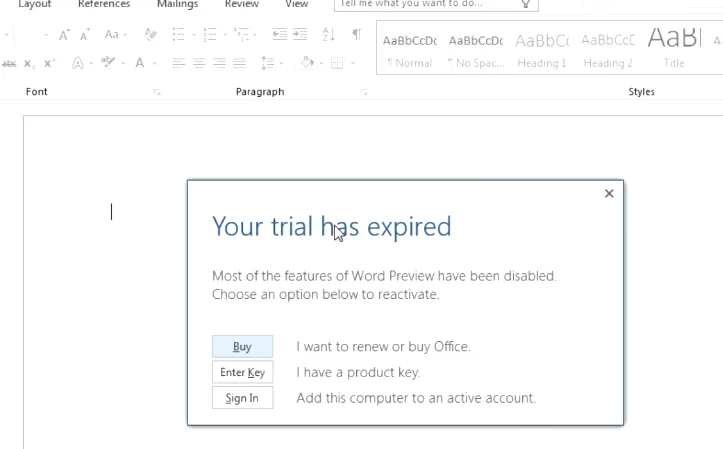
After the Microsoft Office activation grace period expires, the following message may appear:
Your trial has expired
Most of the features of Office Preview have been disabled. Choose an option below to reactivate.
After the evaluation period expires in LTSC Office 2024 and 2021, launching any application displays a notificationThis copy of Microsoft Office is not activated, prompting the user to enter the product key and activate it.
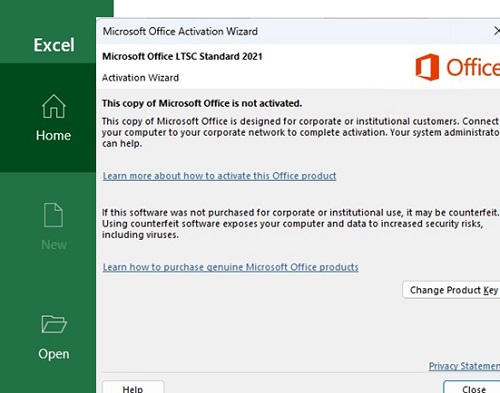
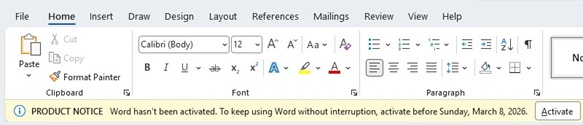
After the trial license expires, it will no longer be possible to edit documents. Instead, documents will open in view-only mode.
Using OsppRearm.exe to Reset Microsoft Office Activation Grace Period
The Microsoft Office (both the classic MSI-based Office 2016/2013/2010 and the Click2Run distribution of Office 2024/2021/2019/Microsoft 365) includes a special ospprearm.exe tool. It is an official Microsoft tool designed for enterprise administrators to reset Office activation timers, and is intended primarily for preparing workstations and corporate Windows images with pre-installed software. I will use the osprearm.exe command to reset the activation grace period for an installed copy of Microsoft Office.
Depending on the operating system and Office version, it may be located in one of the following directories:
%SystemDrive%\Program Files (x86)\Microsoft Office\Office16%SystemDrive%\Program Files\Microsoft Office\Office16%SystemDrive%\Program Files (x86)\Common Files\Microsoft Shared\OfficeSoftwareProtectionPlatform\%SystemDrive%\Program Files\Common Files\Microsoft Shared\OfficeSoftwareProtectionPlatform\
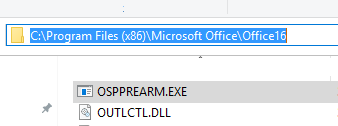
Close all running Microsoft Office applications, open the command prompt as an administrator, and go to the OSPREARM tool folder.
cd %SystemDrive%\Program Files (x86)\Microsoft Office\Office16
Run this command to extend your Office trial for an additional 30 days:
OSPPREARM.EXE

The following message will appear:
Microsoft Office rearm successful
If several different versions of MS Office are installed on the computer, an error will appear when running the ospprealm command.
There was an error when trying to rearm Office. You can try passing the SKU ID as a parameter. Passing the SKU ID is necessary if you are relying on an activation to permit an additional rearm.

Error: 0xc004f025
In this case, you need to specify the SKU ID of the Office version whose trial period you want to rearm. List all Office SKUIDs on a computer:
cscript ospp.vbs /dstatus
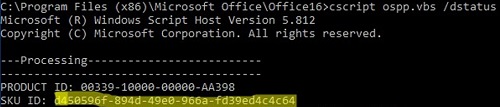
Copy the SKU ID and use it as an argument in the command.
OSPPREARM.EXE d450596f-894d-49e0-966a-fd39ed4c4c64
When running the ospprearm.exe command:
- The Office trial period counter resets to 30 days. The activation timer is frozen until the first launch of any Microsoft Office app or the running of the OSPP.vbs script;
- The computer’s CMID is reset (the KMS server determines unique clients according to their CMID). You can check the current CMID of the computer using the ospp.vbs script. For more information, refer to the KMS activation FAQ).
You can run this command up to three (3) times before the trial expires. Thus, you can extend the total evaluation period for Microsoft Office up to 120 days (4 * 30 days). You can check your Office activation status and the number of days remaining until the end of the grace period:
cd %SystemDrive%\Program Files (x86)\Microsoft Office\Office16
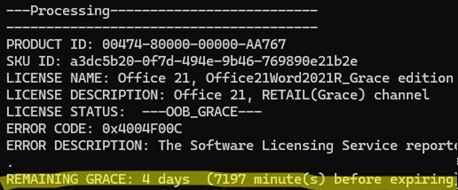
 cscript ospp.vbs /dstatus
LICENSE NAME: Office 21, Office21ProPlus2021R_Grace edition
LICENSE DESCRIPTION: Office 21, RETAIL(Grace) channel
LICENSE STATUS:  ---OOB_GRACE---
ERROR CODE: 0x4004F00C
ERROR DESCRIPTION: The Software Licensing Service reported that the application is running within the valid grace period.
REMAINING GRACE: 4 days (6499 minutes before expiring)
As you can see, a trial version of Microsoft Office 2021 is installed, and the grace period will end in four days.
Rearming Microsoft Office: Retail vs Volume Edition Grace Period
There are differences in extending the activation grace period between the Retail and Corporate (Volume) editions of Office. Only the corporate editions of Office are available for a 30-day trial.
Open a command prompt and run the following commands to check which Microsoft Office edition is installed on your computer:
cd c:\Windows\System32
 cscript slmgr.vbs /dlv all
This command will display information about all the Microsoft products on your computer. Find the sections in the list that refer to Microsoft Office products. For example:
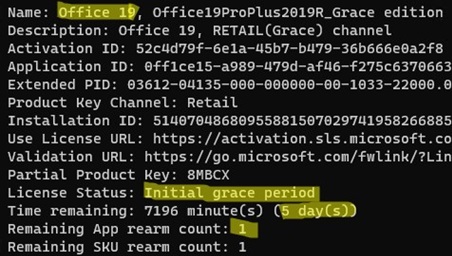
Name: Office 21, Office21ProPLus2021R_Grace edition
In this example, the Retail trial edition of Office is installed on the computer (Description: Office 21, RETAIL(Grace) channel). You can extend this trial only one time (Remaining App rearm count: 1). Retail Office editions can only be extended once for up to five (5) days.
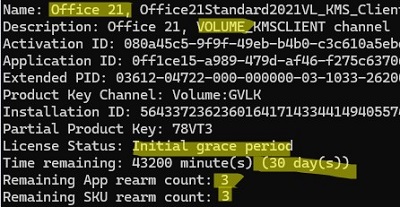
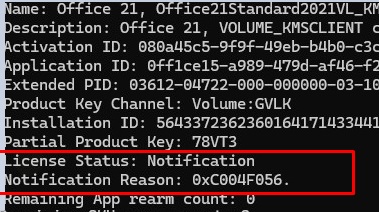
If a corporate edition of Office 2021 is installed on the computer, for example, Office 21, Office21Standard2021VL_KMS_Client_AE edition then its description should look like Office 21, VOLUME_KMSCLIENT channel. The remaining trial period is 30 days, and the license can be rearmed up to three times ( Remaining App rearm count: 3 ).
License Status: Initial grace period indicates that this copy of Office has not been activated and is operating in evaluation mode.
If the trial period has expired, the license status will change to:
Notification Reason: 0xC004F056.
License Status: Notification
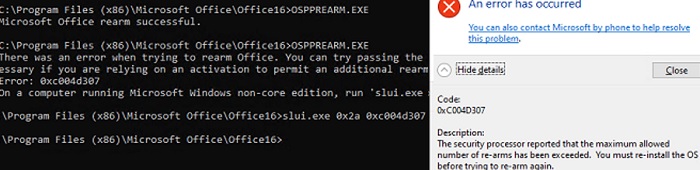
Each time the license is extended using ospprearm.exe, the counter is decreased by one. If the remaining number of rearms for the Office trial license is 0, you will receive error 0xc004d307:
There was an error when trying to rearm Office. You can try passing the SKU ID as a parameter. Passing the SKU ID is necessary if you are relying on an activation to permit an additional rearm.
Error: 0xc004d307
On a computer running Microsoft Windows non-core edition, run 'slui.exe 0x2a 0xc004d307' to display the error text.
Windows Activation. An error has occurred.
Description: The security processor reported that the maximum allowed number of re-arms has been exceeded.  You must re-install the OS before trying to re-arm again.
Resetting a trial Office license using ospprearm.exe is useful when preparing a Windows reference image with preinstalled Office for deployment to user computers via WDS, SCCM, or manual installation. Before capturing the reference image, reset the activation counter using the OSPPREARM command (don’t run any Microsoft Office app until the Windows image capture is complete). In this case, you can use the trial version of Office on the user’s computer for 30 days after deploying the Windows image, with no activation or restrictions.
Reset the Microsoft 365 Apps Trial License Activation
Activation rearming using ospprearm.exe doesn’t work for Office products distributed via Microsoft 365 Apps subscriptions. Use the PowerShell script vnextdiag.ps1 in the C:\Program Files\Microsoft Office\Office16 folder to check the activation status of Microsoft 365 products.
./vnextdiag.ps1 -action list
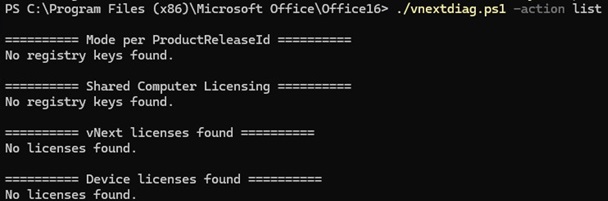
To reset the activation of a specific Microsoft 365 Apps program, use this command (copy the LicenseId value from the previous command’s output):
./vnextdiag.ps1 -action remove -LicenseId APP_GUID_ID
The next time you open the Microsoft 365 app, you can sign in with a different Microsoft account to run into a new trial period.
slmgr /rearm
13 comments
its not work now!
The trial did not extend instead office 2016 was not activated after that.
Thanks. It worked : )
i get an error:
PS C:\Program Files\Microsoft Office\Office16> .\OSPPREARM.EXE
There was an error when trying to rearm Office. You can try passing the SKU ID as a parameter. Passing the SKU ID is necessary if you are relying on an activation to permit an additional rearm.
Error: 0xc004f025
On a computer running Microsoft Windows non-core edition, run ‘slui.exe 0x2a 0xc004f025’ to display the error text.
PS C:\Program Files\Microsoft Office\Office16>
Is that because I did not get the Software expired message as yet?
Open a Command Prompt as Administrator and enter path where OSPPREARM.EXE is installed.
There run:
cscript ospp.vbs /dstatus
You’ll obtain the SKU ID of your office.
Then repeat the OSPPREARM.EXE but with the resulting SKU ID as parameter. Example:
C:\Program Files (x86)\Microsoft Office\Office16>OSPPREARM.EXE dxxxxxxf-8xxd-4xx0-xxxx-fxxxxxxxxxx4
Microsoft Office rearm successful.
Is there a way to increase the counter so we get infinite trial resets?
also, it says rearm is successful but when I open up word, everything is still locked and I can’t type anything or edit anything unless I either sign in or enter product key. how to fix?
that slmgr.vbs /dlv all gives me a huge windows script host window with no scrollbar to the sides so much of the information is cut off unless you have a huge portrait monitor with huge height resolution, which one am I suppose to choose?
ok so I tried cscript slmgr.vbs /rearm-app 3ad61e22-e4fe-497f-bdb1-3e51bd872173 and all I get is c:\Windows\System32\slmgr.vbs(1852, 5) SWbemObjectEx: 0xC004F015 and then checking the status with cscript ospp.vbs /dstatus, I get:
—Processing————————–
—————————————
PRODUCT ID: 00202-30000-00000-AA921
SKU ID: 3ad61e22-e4fe-497f-bdb1-3e51bd872173
LICENSE NAME: Office 16, Office16O365ProPlusR_Grace edition
LICENSE DESCRIPTION: Office 16, RETAIL(Grace) channel
BETA EXPIRATION: 1/01/1601
LICENSE STATUS: —NOTIFICATIONS—
ERROR CODE: 0xC004F009
ERROR DESCRIPTION: The Software Licensing Service reported that the grace period expired.
Last 5 characters of installed product key: VMFTK
—————————————
—————————————
—Exiting—————————–
Is there a way to do this on a Mac?
I have this error:
C:\Program Files\Microsoft Office\Office16>OSPPREARM.EXE fbdb3e18-a8ef-4fb3-9183-dffd60bd0984
There was an error when trying to rearm Office. You can try passing the SKU ID as a parameter. Passing the SKU ID is necessary if you are relying on an activation to permit an additional rearm.
Error: 0xc004d307
On a computer running Microsoft Windows non-core edition, run ‘slui.exe 0x2a 0xc004d307’ to display the error text.
solution for this please
Funciona. Tanks