Windows OS Hub
  • Windows
    • Windows 11
    • Windows 10
    • Windows Server 2025
    • Windows Server 2022
    • Windows Server 2019
    • Windows Server 2016
  • Microsoft
    • Active Directory (AD DS)
    • Group Policies (GPOs)
    • Exchange Server
    • Azure and Microsoft 365
    • Microsoft Office
  • Virtualization
    • VMware
    • Hyper-V
    • Proxmox
  • PowerShell
  • Linux
  • Home
  • About

Windows OS Hub

  • Windows
    • Windows 11
    • Windows 10
    • Windows Server 2025
    • Windows Server 2022
    • Windows Server 2019
    • Windows Server 2016
  • Microsoft
    • Active Directory (AD DS)
    • Group Policies (GPOs)
    • Exchange Server
    • Azure and Microsoft 365
    • Microsoft Office
  • Virtualization
    • VMware
    • Hyper-V
    • Proxmox
  • PowerShell
  • Linux

 Windows OS Hub / Active Directory / Change Default OU for New Computers and Users in AD

February 2, 2026

Change Default OU for New Computers and Users in AD

By default, when a computer is joined to a domain via the System Properties GUI (sysdm.cpl), an account is created in the root Computers container. This is the default container for all new computer objects in the domain.

Technically, the Computers root container is not an Organizational Unit (OU), and you cannot assign Group Policies to it. It is only affected by root domain GPOs, including the Default Domain Policy. This could potentially be insecure because new computers may not immediately receive the necessary security policies from production computer OUs. Domain admins must track the creation of new computer accounts in the default Computers container and manually move objects to the appropriate Organizational Units.
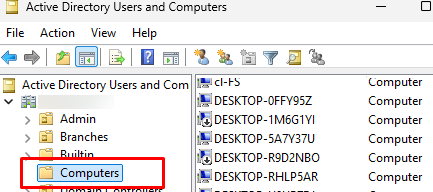
Default Computers OU in AD

A domain admin can change the OU for new computers using the built-in redircmp.exe command.

Show the current default container for new computers.

Get-ADDomain | select ComputersContainer
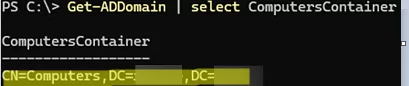
Get-ADDomain - check defaultComputersContainer

The wellKnownObjects attribute in the domain naming context actually defines the default containers for new objects.

To change this container to a different target OU, specify its distinguishedName in the following command:

redircmp.exe "OU=Workstations,OU=LA,DC=woshub,DC=com"

Check that the default container for computers has changed.
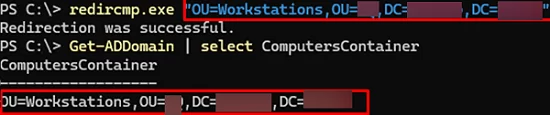
redircmp - redirect default computer location in Active Directory

Likewise, you can locate the current default container for user accounts. When creating a new user with the New-ADUser cmdlet (or other CLI tools) without specifying a target OU, t the account is created in the root container CN=User.

Get-ADDomain | select usersContainer
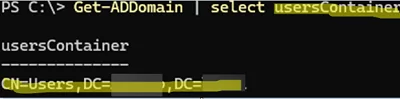
Default usersContainer in domain

Use the redirusr.exe command to change the default OU for new user accounts:

redirusr "OU=Users,OU=LA,DC=woshub,DC=com"
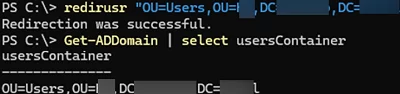
redirusr - changing default OU for new users

These commands change the default target OUs for new computer and user accounts. Previously created AD objects are not moved automatically. They will need to be moved manually using either the ADUC snap-in or PowerShell.
0 comment
0
Facebook Twitter Google + Pinterest
Active DirectoryPowerShellQuestions and AnswersWindows Server 2025
previous post
NVMe SSD Not Detected During Windows 11 Installation

Related Reading

Refresh AD Groups Membership without Reboot/Logoff

March 15, 2024

Allow Non-admin Users RDP Access to Windows Server

March 16, 2024

Extend an Expired User Password in Active Directory

December 23, 2024

How to Disable NTLM Authentication in Windows Domain

March 16, 2024

Configure Windows LAPS (Local Administrator Passwords Solution) in...

March 15, 2024

How to Add, Set, Delete, or Import Registry...

June 8, 2023

How to Get a List of Local Administrators...

March 16, 2024

How to Reset Active Directory Domain Admin Password

June 8, 2023

Leave a Comment Cancel Reply

join us telegram channel https://t.me/woshub
Join WindowsHub Telegram channel to get the latest updates!

Recent Posts

  • How to Remove Old (Unused) PowerShell Modules

    January 12, 2026
  • How to Move (Migrate) Existing Windows Shares to a New File Server

    December 24, 2025
  • Using KDC (Kerberos) Proxy in AD for Remote Access

    December 23, 2025
  • Windows: Create (Install) a Service Manually

    December 16, 2025
  • Windows: Auto Switch to Strongest Wi-Fi Network

    December 10, 2025
  • How to Enable or Disable VBScript in Windows after Deprecation

    December 10, 2025
  • Start Menu Not Working (Unresponsive) on Windows Server RDS

    November 27, 2025
  • AppLocker: Configure Application Restriction Policies in Windows

    November 19, 2025
  • Enable/Disable Random Hardware (MAC) Address for Wi-Fi on Windows

    November 14, 2025
  • Automate Software and Settings Deployment with WinGet Configure (DSC)

    November 13, 2025

Follow us

  • Facebook
  • Twitter
  • Youtube
  • Telegram
Popular Posts
  • How to Find AD Users with Blank Passwords (Password-Not-Required)
  • How to Create a User Account Without a Password on Windows
  • Using KDC (Kerberos) Proxy in AD for Remote Access
  • AD Domain Join: Computer Account Re-use Blocked
  • Collecting Windows and Active Directory Event Logs with Graylog
  • Exclude a Specific User or Computer from Group Policy
  • How to Block Common (Weak) Passwords in Active Directory
Footer Logo

@2014 - 2024 - Windows OS Hub. All about operating systems for sysadmins


Back To Top