Although the IPv6 protocol is enabled by default in all versions of Windows, it is rarely used in home and small office networks. Consequently, many online sources suggest disabling the IPv6 protocol in Windows as an unnecessary feature (and even potentially harmful) at the first sign of any network issues.
However, Microsoft doesn’t recommend completely disabling IPv6 in Windows unless there is a critical and well-justified need. This is especially true on the Windows Server platform, where many components use link-local IPv6 addresses for internal communication, even when external IPv6 addresses are not used.
How to Make Windows Prefer IPv4 Over IPv6
Instead of disabling IPv6 if your ISP, router, or an app is not working correctly with it enabled, first try changing the protocol priority to make Windows prefer IPv4 over IPv6.
AAAArecord in DNS) and IPv4 (A record) addresses are available when resolving the remote host name, the system first attempts to establish a connection using the IPv6 address. Additional delays or connection errors may occur if this address is unreachable or if a specific network service (or legacy app) doesn’t support IPv6. When choosing a protocol for a remote connection, IPv6 is used by default. The priority of the IPv6 protocol over the IPv4 protocol is configured in the Prefix Policies settings (see the post “Changing the Priority of IPv4 Over IPv6 in Windows” for more details).To fix problems with such applications, Microsoft recommends reducing the priority of IPv6 instead of disabling it.
In order to prioritize IPv4 over IPv6, create the DisabledComponents registry parameter and set its value to 0x20.
reg add HKLM\system\currentcontrolset\services\tcpip6\parameters /v DisabledComponents /t REG_DWORD /d 0x20
| DisabledComponents value | Description |
0 | IPv6 is enabled (default) |
0x10 | Disable IPv6 on all nontunnel interfaces |
0x01 | Disable IPv6 on all tunnel interfaces |
0x11 | Disable IPv6 (except the loopback) |
0x20 | Prefer IPv4 over IPv6 (preferred method) |
0xFF | Disable IPv6 completely (not recommended) |
You can also change the IPv4 over IPv6 preference order in the prefix policy by using the commands (no reboot is required):
netsh interface ipv6 set prefix ::/96 60 3
 netsh interface ipv6 set prefix ::ffff:0:0/96 55 4
How to Properly Disable IPv6 on Windows
If reducing the IPv6 protocol priority fails to resolve the issue, consider disabling IPv6 completely. However, this action must also be performed correctly.
Many administrators mistakenly believe that unchecking the Internet Protocol Version 6 (TCP/IPv6) option in the network adapter properties via ncpa.cpl is enough to completely disable IPv6 on a computer. However, this does not fully disable the IPv6 protocol stack in Windows. This action disables IPv6 on a specific network adapter while keeping the IPv6 stack active system-wide.
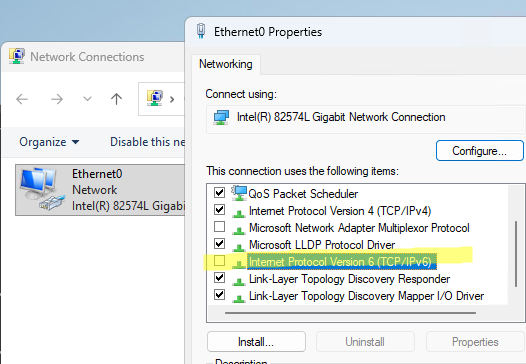
Furthermore, disabling IPv6 via this method can cause issues with certain network applications.
Disable-NetAdapterBinding -Name "Ethernet0" -ComponentID ms_tcpip[6]
Get-NetAdapterBinding Ethernet0
![Disable the ipv6 component (ms_tcpip[6] ) for a network interface via PowerShell](https://woshub.com/wp-content/uploads/2026/04/disable-the-ipv6-component-ms_tcpip6-for-a-ne.png.webp)
This command disables IPv6 binding on the specified interface. This can be confirmed by checking that the IPv6 address has disappeared from the network interface configuration (ipconfig /all). However, the IPv6 protocol stack remains enabled in the system.
Changing the value of the DisabledComponents parameter to 0xFF will completely disable the IPv6 stack on your computer:
reg add HKLM\system\currentcontrolset\services\tcpip6\parameters /v DisabledComponents /t REG_DWORD /d 0xFF
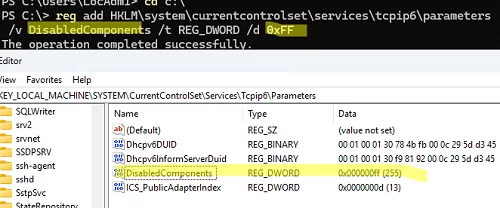
After running this command, restart the computer.
How can you verify that IPv6 is disabled (there are no addresses, no routes, and no listening services)?
Attempting to list network interfaces that support IPv6 will return an empty result:
netsh interface ipv6 show interfaces
Or you can simply ping the loopback interface. With IPv6 enabled, the command will return the loopback interface’s IPv6 address (::1). When IPv6 is disabled, the loopback adapter will return the IPv4 address 127.0.0.1
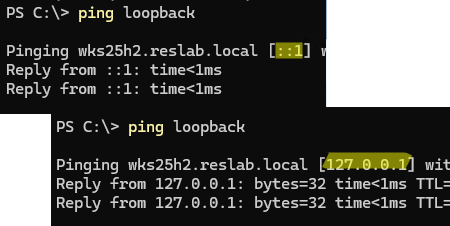
To revert the changes and enable IPv6 protocol support, change the DisabledComponents parameter value to 0 or delete it:
reg delete "HKLM\SYSTEM\CurrentControlSet\Services\Tcpip6\Parameters" /v DisabledComponents /f