Many users have complained that the keyboard shortcut for switching between input languages in Windows 11 doesn’t always work as expected. Sometimes, users must press the left Alt + Shift keyboard shortcut two or three times to switch input languages successfully (for example, from German to English or vice versa).
As a workaround, use the keyboard shortcut ⊞ Win + Spacebar to switch input languages instead of left Alt + Shift. This keyboard shortcut always works on the first try.
The initial issue with keyboard input language switching in Windows 11 was caused by the slow rendering of the language bar pop-up in the taskbar triggered by pressing the left Alt + Shift keys.
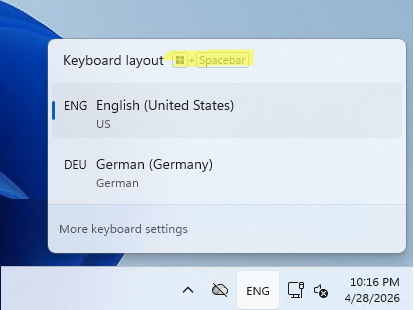
If a user presses the hotkey too quickly and immediately starts typing again, the pop-up doesn’t have enough time to render and activate the new keyboard layout. Holding down the Alt+Shift keys for an additional one to two seconds will make language switching more stable (the correct way is to first press and hold the left Alt key, then press the left Shift key).
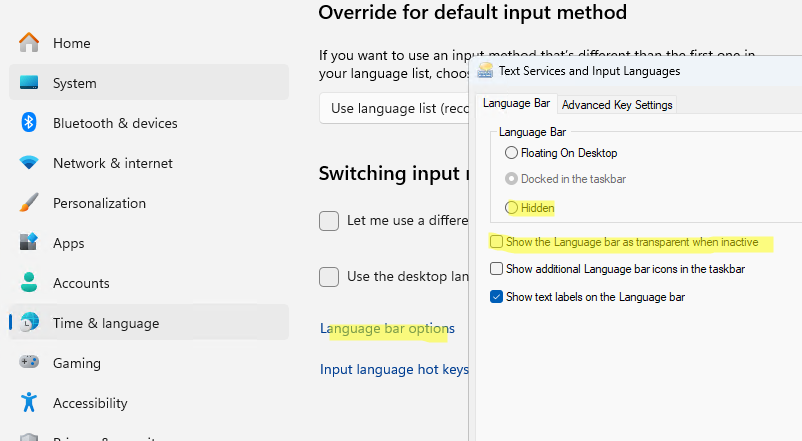
Additionally, the keyboard shortcut fails to switch the input language if the Windows language bar is hidden. To show it, go to Settings -> Time & language -> Typing -> Advanced keyboard settings -> Language bar options. Disable the following options on the Language bar tab:
- Hidden
- Show the Language bar as transparent when inactive
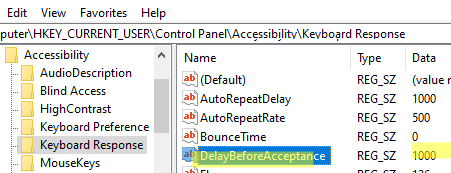
Windows has a special Filter Keys option that is designed to ignore (filter out) brief or repeated keystrokes. This option can be configured via the registry parameter DelayBeforeAcceptance under HKEY_CURRENT_USER\Control Panel\Accessibility\Keyboard Response . The default value here is 1000 milliseconds (1 second). This represents the minimum duration a keyboard key must be held for Windows to register the keystroke. Users who type quickly and often switch between input languages should consider reducing the keyboard layout switching delay value (a reboot will be required):
reg add "HKCU\Control Panel\Accessibility\Keyboard Response" /v "DelayBeforeAcceptance" /t REG_SZ /d "50" /f