Windows OS Hub
  • Windows
    • Windows 11
    • Windows 10
    • Windows Server 2025
    • Windows Server 2022
    • Windows Server 2019
    • Windows Server 2016
  • Microsoft
    • Active Directory (AD DS)
    • Group Policies (GPOs)
    • Exchange Server
    • Azure and Microsoft 365
    • Microsoft Office
  • Virtualization
    • VMware
    • Hyper-V
    • Proxmox
  • PowerShell
  • Linux
  • Home
  • About

Windows OS Hub

  • Windows
    • Windows 11
    • Windows 10
    • Windows Server 2025
    • Windows Server 2022
    • Windows Server 2019
    • Windows Server 2016
  • Microsoft
    • Active Directory (AD DS)
    • Group Policies (GPOs)
    • Exchange Server
    • Azure and Microsoft 365
    • Microsoft Office
  • Virtualization
    • VMware
    • Hyper-V
    • Proxmox
  • PowerShell
  • Linux

 Windows OS Hub / SQL Server / MS SQL Server Setup Stucks on Install/Uninstall

March 12, 2024

MS SQL Server Setup Stucks on Install/Uninstall

When installing a new SQL Server instance (or updating/removing it), you may find that the installation process freezes when reaching the Install_SQLSupport_CPU64_Action step:

Install_sql_common_core_Cpu64_Action : Write_NativeImage_64. : Generating native images
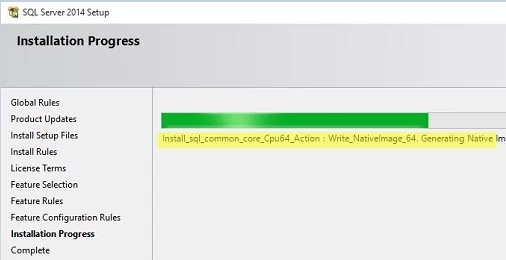
SQL Server Setup hangs at Install_sql_common_core_Cpu64_Action

The problem may occur when installing/uninstalling/updating Microsoft SQL Server 2019, 2017, 2014, or 2012, as well as SQL Server Management Studio

To fix the error, go to the SQL Server distribution directory (SQLServerMedia\<YOUR_SQL_ENU>\1033_ENU_LP\x64\Setup) and run SQLSUPPORT.msi.

The next step is to kill the Windows Installer (msiserver) process. Open a command prompt as an administrator and run the following command:

taskkill /F /FI "SERVICES eq msiserver"
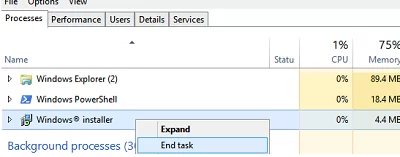
kill windows installer process

See How to kill a not responding service process on Windows.

Once you’ve done that, the SQL Server installation shall proceed as usual.

The bug usually occurs when another program or process is currently using some Windows Installer service handlers and prevents you from continuing to install another package. It may cause the SQL Server installation to crash.

You might want your SQL Server installer to skip checking Windows Installer handlers. To do this, you need to run it with the /SkipInstallerRunCheck parameter:

Setup.exe /SkipInstallerRunCheck

0 comment
0
Facebook Twitter Google + Pinterest
Questions and AnswersSQL Server
previous post
Fix: The Requested Certificate Template is Not Supported by This CA
next post
Adding Trusted Root Certificates on Linux

Related Reading

Upgrade Microsoft SQL Server Evaluation Edition to Standard/Enterprise

March 12, 2024

Find and Remove Locks in Microsoft SQL Server

March 3, 2023

Connect to MS SQL Server Database in Visual...

March 15, 2024

Configuring Always-On High Availability Groups on SQL Server

March 12, 2024

Leave a Comment Cancel Reply

join us telegram channel https://t.me/woshub
Join WindowsHub Telegram channel to get the latest updates!

Recent Posts

  • How to Move (Migrate) Existing Windows Shares to a New File Server

    December 24, 2025
  • Using KDC (Kerberos) Proxy in AD for Remote Access

    December 23, 2025
  • Windows: Create (Install) a Service Manually

    December 16, 2025
  • Windows: Auto Switch to Strongest Wi-Fi Network

    December 10, 2025
  • How to Enable or Disable VBScript in Windows after Deprecation

    December 10, 2025
  • Start Menu Not Working (Unresponsive) on Windows Server RDS

    November 27, 2025
  • AppLocker: Configure Application Restriction Policies in Windows

    November 19, 2025
  • Enable/Disable Random Hardware (MAC) Address for Wi-Fi on Windows

    November 14, 2025
  • Automate Software and Settings Deployment with WinGet Configure (DSC)

    November 13, 2025
  • SMB over QUIC: Mount File Share over Internet without VPN on Windows Server 2025

    November 4, 2025

Follow us

  • Facebook
  • Twitter
  • Telegram
Popular Posts
  • 0x80244010 Exceeded Max Server Round Trips: Windows Update Error
  • Permanently Disable Driver Signature Enforcement on Windows 11
  • Shutdown/Restart Windows using Command Prompt and PowerShell
  • How to Force Remove a Printer That Won’t Uninstall on Windows
  • Enable All CPU Cores on Windows 10 and 11
  • How to Completely Remove/Uninstall a Driver in Windows
  • Fix: Windows Update Tab (Button) is Missing from Settings
Footer Logo

@2014 - 2024 - Windows OS Hub. All about operating systems for sysadmins


Back To Top